New · Puppy, cat or pelican — your pick
A cat assistant for your desk.
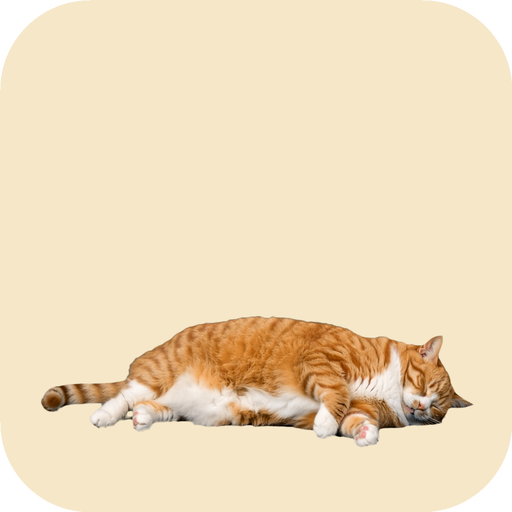
Desk Dorm is a little desktop assistant: a chubby orange cat that naps at the bottom of your screen, meows when it’s time for something, keeps you company, and helps you through the day. Prefer a puppy? Same app — pick at first launch, switch any time.
Download free — foster the cat for 7 days, everything unlocked
Windows: a short install guide opens first (Windows shows a one-time “PC protection” screen for new apps).
Shelter cats, live in the cat’s speech bubble
Double-click the cat: real cats from rescues and cat rooms around the world go about their day in a small bubble over its head while you work. Site Guard pauses YouTube while it’s open.

Type a time and a note → the cat meows and holds it up
At that moment it wakes up, meows, and keeps your note in a speech bubble until you tap Done.
Team call in 5 minutes. Grab your notes 🐾
Reminders that are impossible to ignore
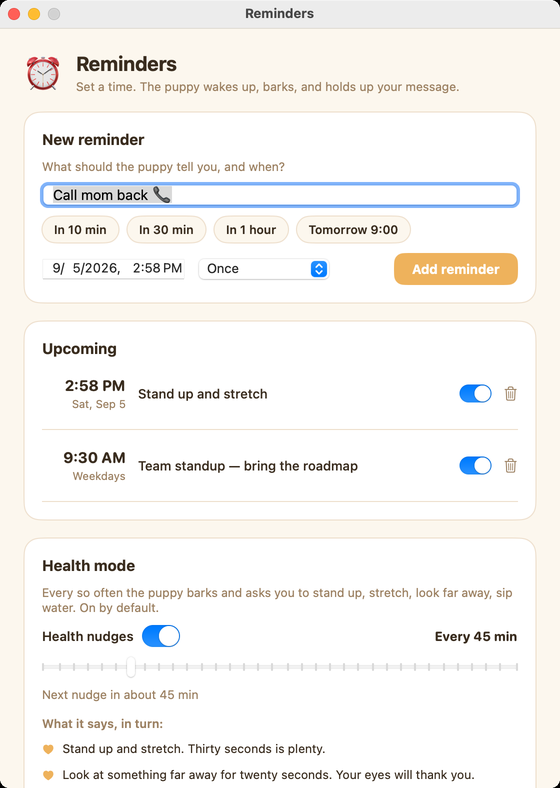
Notifications slide by. A barking puppy with a sign does not. Set one in three seconds from the paw menu.
Type it
A message and a time — or just tap “In 30 min”, “In 1 hour”, “Tomorrow 9:00”. Once, every day, or weekdays.
The puppy barks
At that moment it stands up, barks a couple of times, and holds your message above its head in a speech bubble.
Tap Done
Tap Done and it lies back down. Your Mac was asleep? It barks the moment you’re back.
Health mode — on by default
Every 45 minutes (you choose 15–180) the puppy barks and asks you to stand up and stretch, look at something far away, sip water, fix your posture, breathe. It stays quiet while you’re away from the Mac. Turn it off in Reminders if you’d rather not.
Cat person? Same app.
Pick Puppy or Cat the first time Desk Dorm opens, and switch any time from the menu. The cat is the mascot of Cat Dorm, the live map of shelter cat cams. It walks in, naps, meows when it’s time, and hops when the tabs close.
Born on the shelter live cams.
The puppy is the mascot of Dog Dorm, the live map of shelter dog cams around the world. It napped in the corner of every stream. Now it can nap on your desk.
Bird person? Same app.
Pick Puppy, Cat or Pelican the first time Desk Dorm opens, and switch any time from the menu. The pelican is the mascot of Nest Dorm, the live map of raptor and seabird nest cams. It strolls in, naps, squawks when it’s time, and hops with its wings out when the tabs close.
Your desk has a puppy now
Desk Dorm hides in your menu bar. The puppy walks in from the left, flops down at the bottom of your screen and falls asleep. Pet it and it wiggles. When a site you picked has been open too long, the paw in the menu bar starts counting down.

Site Guard New
Pick the sites — YouTube, X, Instagram, TikTok, Reddit, Netflix, Twitch, or any domain you type. Keep one open past your limit, in any window, even behind other apps, and the puppy wakes up and barks. A countdown appears above its head, then every open tab of that site is closed. Click the countdown to close right away.
Pet it
Click the puppy and it wiggles. The paw counts your pets. Poke it five times in a row and it walks off in a huff — it comes back.
Dial in your guard
1–120 minutes before the bark · 3–120 seconds of countdown. Set in paw menu → Site Guard settings.
Also, it does these things
Menu bar only
A paw in your menu bar. No dock icon.
Click-through
Sits above your windows, lets clicks pass everywhere but its body.
Four sizes, anywhere
Small, Medium, Large, Giant. Drag it anywhere on the screen.
Pet counter
Every wiggle is counted. High score pending.
Walks and comes back
Goes for a walk now and then. Poke it five times and it leaves in a huff.
Launch at login
Always there when you sit down.
Updates itself
Checks once a day and updates in place. Or use paw menu → Check for Updates.
No account
A license key from Polar. Three computers, Mac or Windows. That’s the whole setup.
Frequently asked questions
What is Health mode?
A gentle routine, on by default: every 45 minutes the puppy barks and asks you to stand up and stretch, look far away for twenty seconds, sip water, fix your posture or take three slow breaths. It pauses while you’re away from the Mac. Change the interval or turn it off in paw menu → Reminders.
How do reminders work?
Paw menu → Reminders. Type a message, pick a time (or tap In 30 min), choose once / every day / weekdays. At that moment the puppy stands up, barks, and holds your message in a speech bubble until you tap Done.
What if my Mac is asleep or I’m away?
The reminder fires as soon as your Mac is awake again — the puppy barks and the bubble stays up until you deal with it. Nothing gets lost in a notification list.
Wait, it closes my tabs?
Only the tabs of the sites you picked, only after you kept them open past your limit, and only after a countdown you can see above the puppy. Click the countdown to close early, or turn Site Guard off and the puppy just naps.
Does it work on Intel Macs?
Yes. Desk Dorm is a universal app: Apple silicon and Intel, macOS 13 (Ventura) or newer. On Windows it needs Windows 10 (1809+) or 11, 64-bit; the WebView2 runtime that ships with Windows 11 is installed automatically if missing.
Which browsers does Site Guard support?
Safari, Chrome, Brave, Edge, Arc, Whale, Vivaldi and Opera. macOS asks you once per browser to allow automation. Firefox exposes no tab data, so it can’t be guarded.
Does it drain my battery?
No. The puppy is three short alpha videos on a transparent window. Asleep, it costs about as much as a paused video. Site Guard asks your browser for its tab list every two seconds, which is a single lightweight request.
Will it get in the way?
The puppy sits above your windows but lets every click through except on its body. Drag it anywhere on the screen, pick Small to Giant, or send it for a walk from the paw menu.
Is there a free trial?
Yes — you foster first. Download Desk Dorm free, and for 7 days everything is unlocked: reminders, Site Guard, health nudges, live cams and all three pets. After 7 days the pet goes back to the shelter and only visits for 10 minutes at a time until you adopt it. Your license key is emailed and activates automatically, and it works on up to three computers (Mac or Windows), updates included. Not for you? See the refund policy.
Can I get a refund?
If it isn’t for you, email us and we’ll sort it out. See the refund policy for the details.
Is there a Windows version?
Yes. Desk Dorm for Windows (Windows 10/11, 64-bit) — same puppy and cat, reminders, Site Guard and health nudges. One key works on Mac and Windows, up to 3 computers. The installer is new and not yet code-signed, so Windows may show “Windows protected your PC” — choose More info → Run anyway.
built with by somodus
PrivacyTermsRefund policyRecover Key
© 2026 somodus. Desk Dorm and the puppy are ours; please don’t copy them.